
Why I started building this
My own center has a website I built. The honest problem with it was me. The office could not manage it themselves, so every change came back to me — and what they actually wanted was something they could run from the office on a Tuesday without calling anybody.
Then our minister showed me Tithely, and what he liked about it was real: a lot of what a center needs, finally in one system instead of five.
And everything he found was built for Christian churches. Not just the marketing — the setup, the words on the screens, the assumptions about how a congregation runs. Tithes. Pledge campaigns. Small groups. Ministries. That is exactly the right vocabulary for the churches those products were built for, and they serve them well. It is simply not the vocabulary we use, and there is usually no way to change it.
So we use it anyway, and the words never quite match what we call things. That is a smaller problem for a large church with paid staff than it is for a small center run by volunteers on a Tuesday night. If the software says something your community does not say, somebody has to translate it in their head every time they sit down.
It still did not cover everything a center does. He is running a Google Form for community requests, because there is nowhere in it for that. There are other pieces bolted on beside it for the same reason. So it became one more system among several rather than the single place we were hoping for, and at the end of the year somebody still sits down and makes all of it agree by hand.
That is the whole reason Centerly exists. Not because Tithely is bad — it is not, and we still pay for it. The gap is that no single one of these systems covers what a center actually does day to day, so every center ends up assembling its own patchwork and then maintaining that patchwork forever.
I have heard the same story from other centers and churches. You can pay real money for church software and still be running five things.
Centerly is my attempt at the other thing: one system instead of five, where the pieces already know about each other, nothing has to be patched together, and the office can run it without phoning the person who built it.
Centerly is all-in-one church management and online giving software. Donations, member records, events, classes, the community board and pastoral care are one system — not five products patched together. It runs on your own website, takes payments through your own account, and speaks in your community’s own words. It is still being built. A small beta opens soon and I am looking for a few churches to try it.
What it looks like
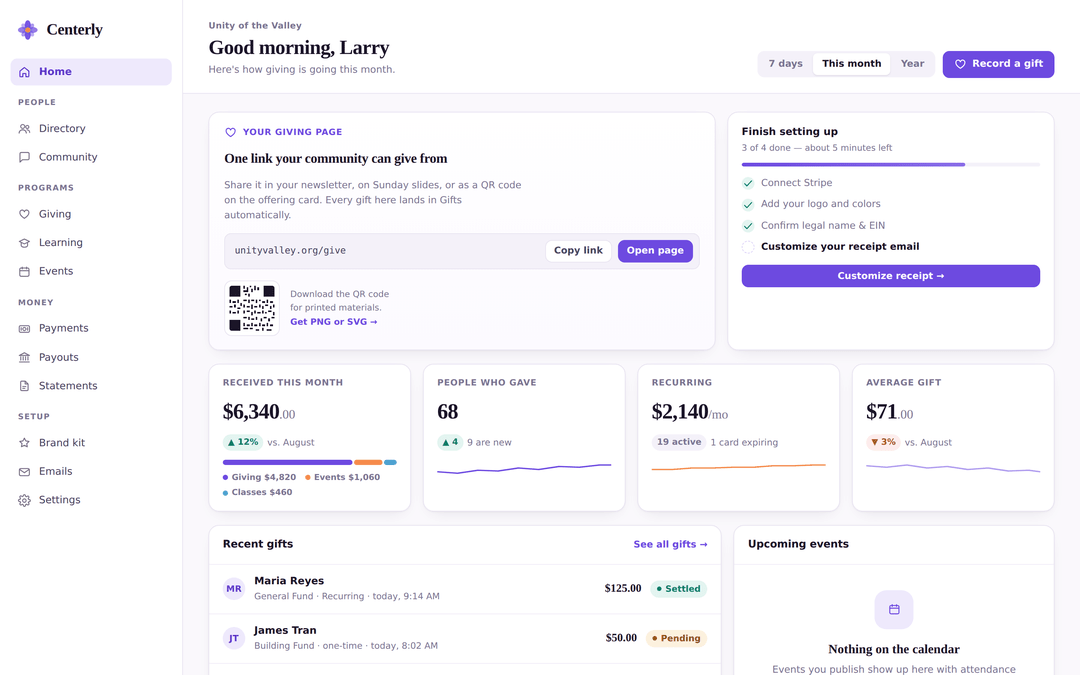
One screen for the people who run the church, with plain labels: Giving. Directory. Community. Care. Events. Classes. Money.
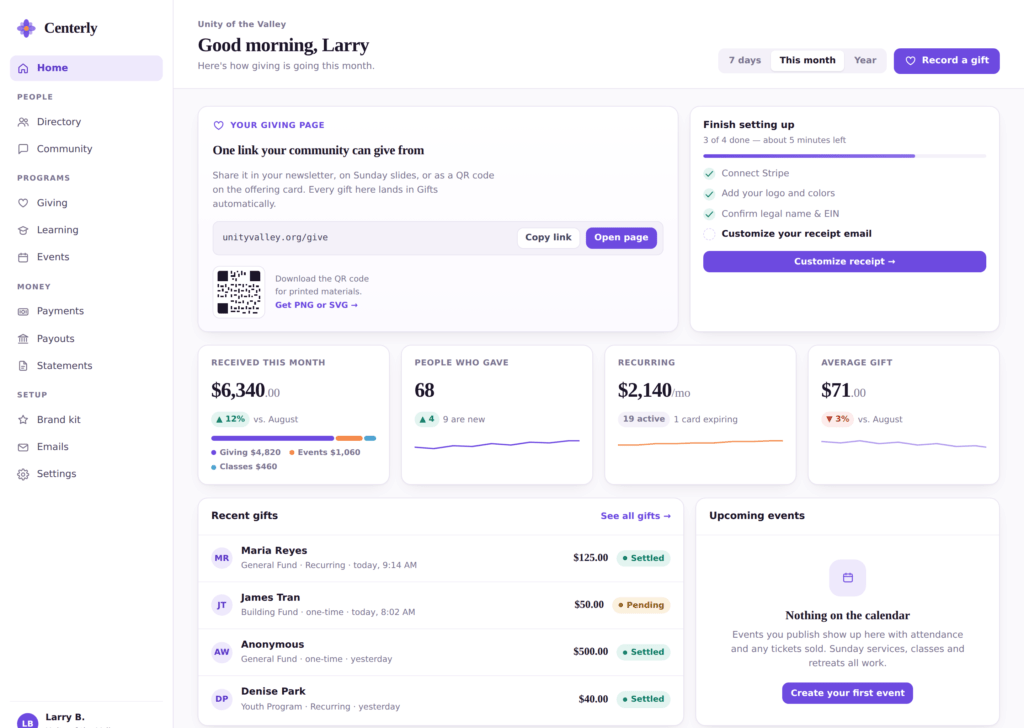
It is a real program, not a settings page. A volunteer treasurer should not have to learn how websites work in order to look up a donation, and here they do not.
Your giving page is one web address — yourchurch.org/give — plus a QR code you can put on the Sunday slides, in the newsletter, or on the offering card. Someone gives, and it shows up in your records on its own. Nobody types it in.
One place where all the money lands
This is the part that usually ends up spread across systems. In Centerly, every dollar goes through the same door: the Sunday offering, a $25 monthly gift, a retreat ticket, tuition for a six-week class, a mug from the bookstore, a membership renewal.
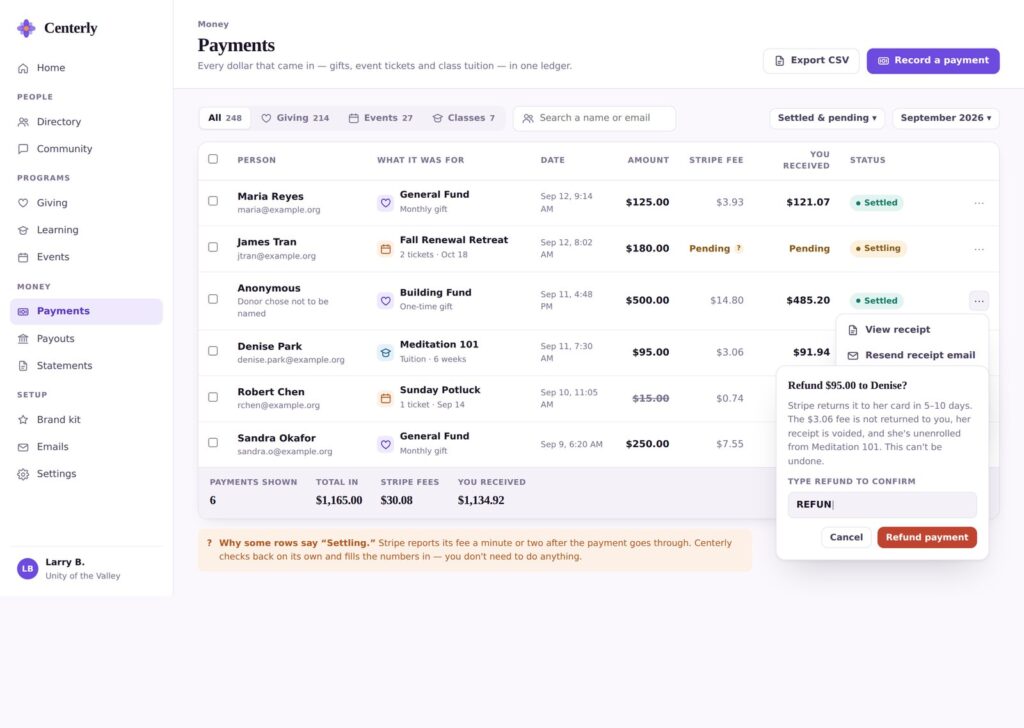
One list. What came in, what the card fee was, what actually reached your bank. You can look at just the donations, or just the events, or just the classes. You can download the whole thing as a spreadsheet any time you want, and hand it to whoever does your books.
Which means “how much came in this month, and how much of it counts as a tax-deductible donation?” is one question with one answer — instead of four downloads and an afternoon.
Keeping track of people who need something
Every church looks after its people, and it is usually the part with no software behind it at all — so it lives in a notebook, a group text, or one person’s memory.
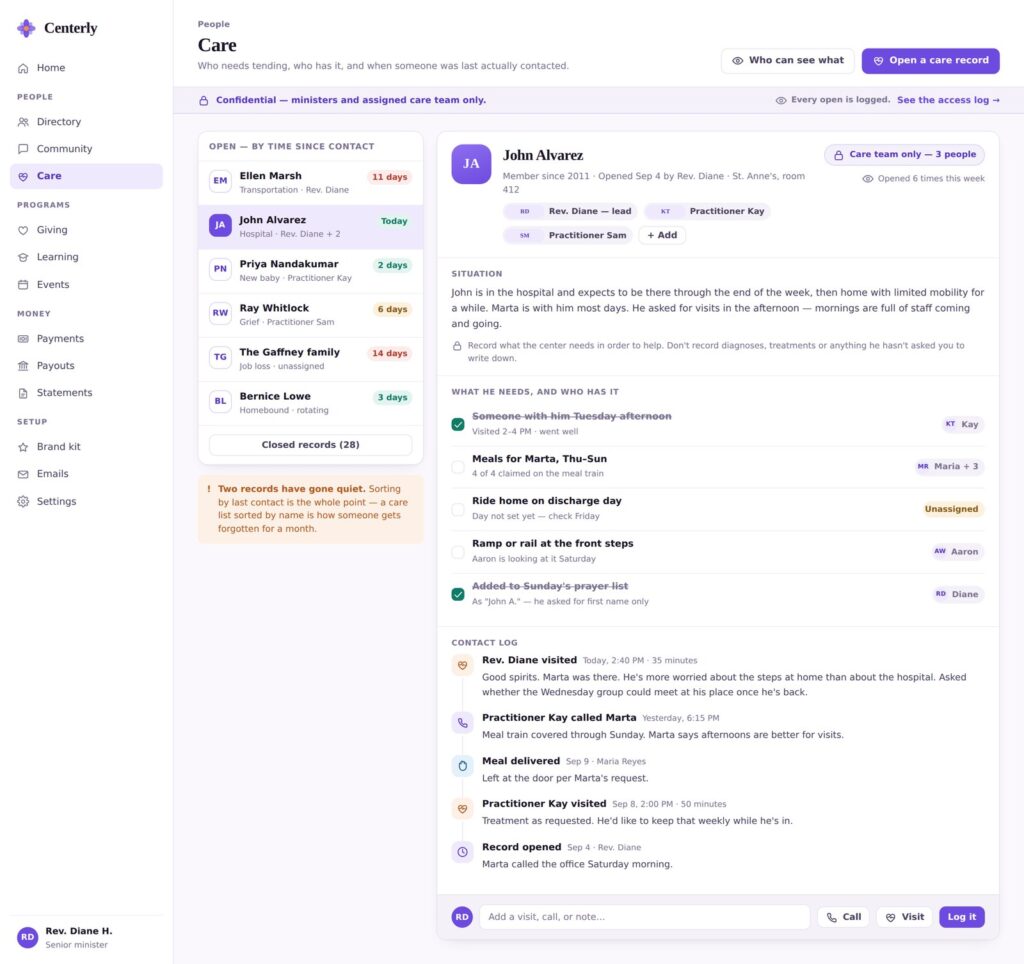
The list sorts by how long it has been since anyone actually made contact — not alphabetically. A list sorted by name is exactly how somebody goes six weeks without a phone call.
Each entry holds what is going on, what the family needs, who is handling each piece, and a log of every visit and call. Only the minister and the assigned team can see it, every time someone opens it is recorded, and the form tells you plainly not to write down medical details or anything the person did not ask you to write down. It is there to organize help, not to keep a file on somebody.
This one is part of the paid version.
A place to ask for help, and a place to offer it
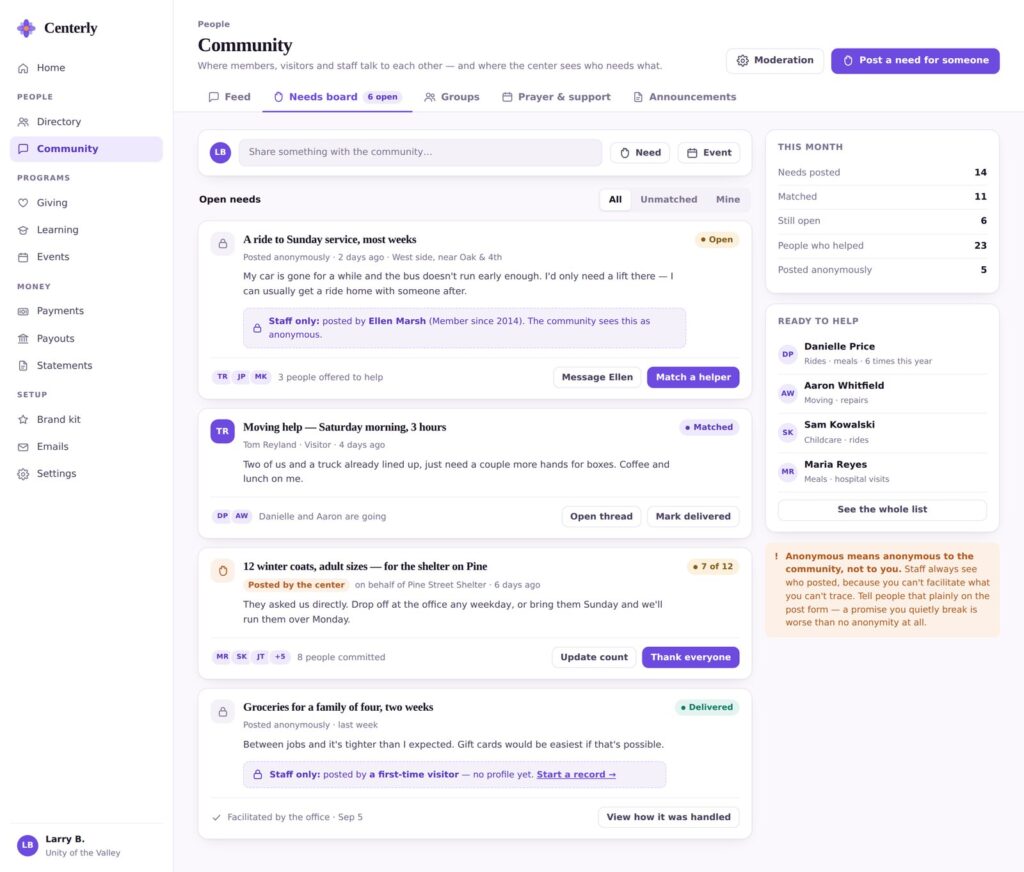
This is the one that started as a Google Form at my own center. A ride to Sunday service. Meals for a family for a week. Two more pairs of hands for a move on Saturday. Twelve winter coats for the shelter down the road.
People post what they need, other people sign up to help, and the office can see who has been matched and who has been sitting there unanswered.
You can post without your name showing to everyone else — and the screen says out loud that the office still sees who you are, because somebody has to be able to actually reach you. A promise you quietly break is worse than not making it.
Also part of the paid version.
Everything about one person, on one page
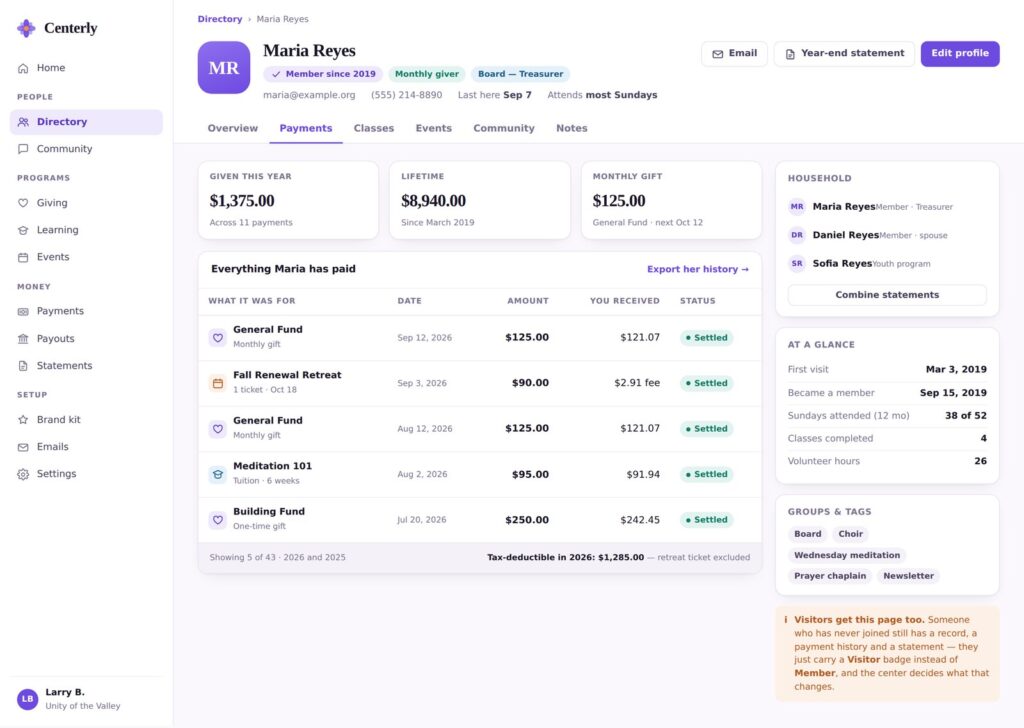
What they have given, what classes they took, what events they came to, who else is in their household, what groups they are in, how often they have been on a Sunday, and any notes. One page instead of five places to check.
Two things worth pointing out. Families stay together — a spouse and a kid in the youth program sit under one household, and their year-end statement can go out as one letter. And the tax-deductible total is worked out for you. That retreat ticket is left out automatically, because the system already knew a ticket is not a donation when it was sold.
Visitors get a page too. Somebody who has never joined still has a record and a statement — they are just marked as a visitor, and you decide what that means at your church.
It works on a phone
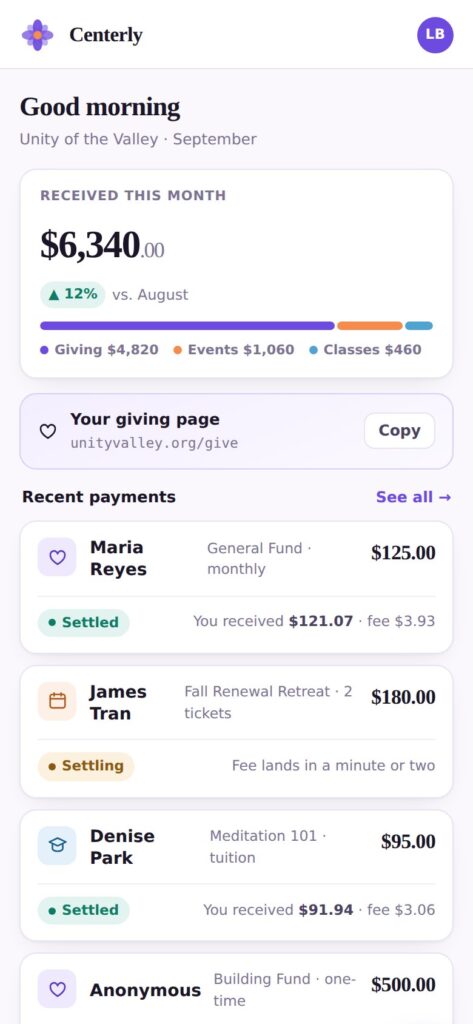
Because the treasurer checks on Sunday afternoon in the parking lot, not Monday morning at a desk.
And this is what your members see
Everything above is the staff side. This is the page somebody opens on a Sunday morning to give.
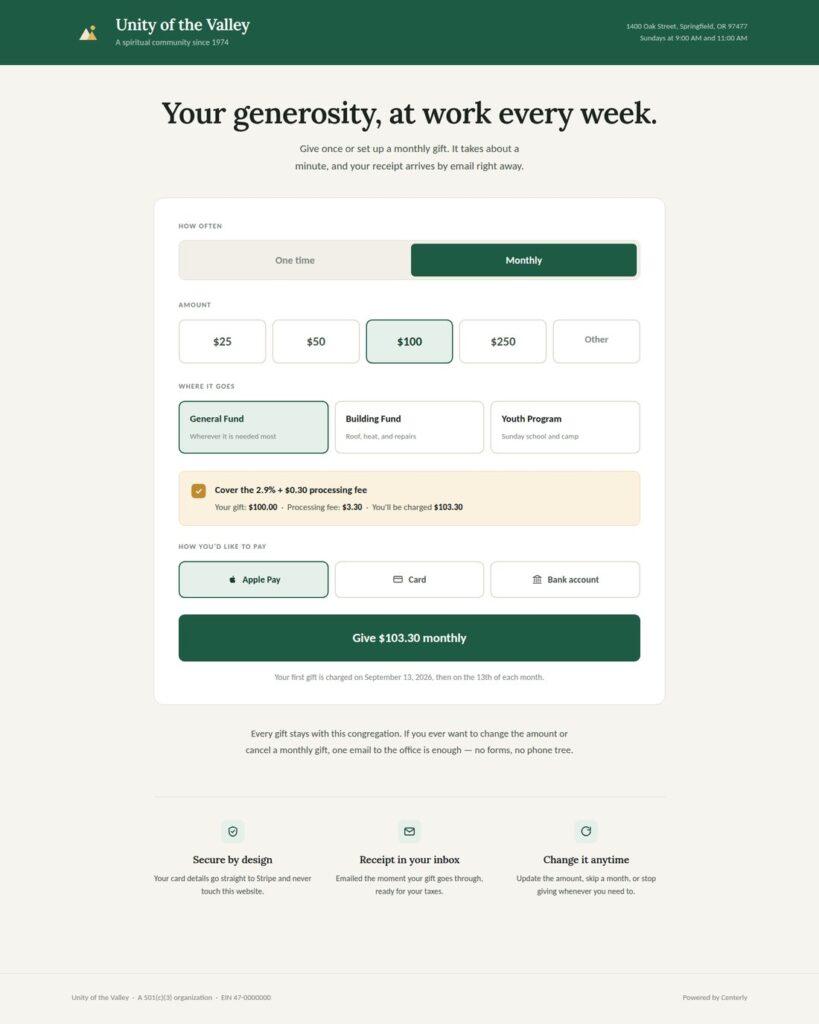
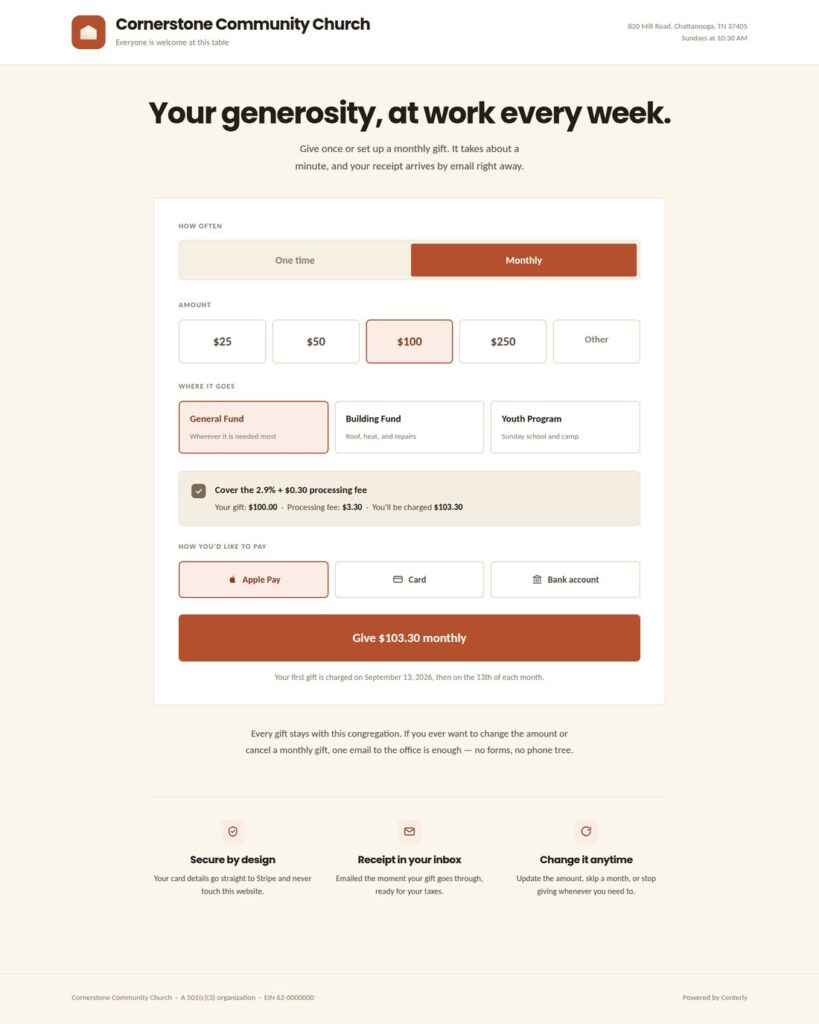
Those are the same page. Same layout, same buttons, same everything underneath — wearing two different churches’ logos and colors. Your members see your church, not a software company.
A few things on it that churches ask for and rarely get in one place: give once or give monthly without going to a different page, a choice of funds, Apple Pay and bank transfer as well as cards, and an option to cover the processing fee that shows the actual math — a $100.00 gift, a $3.30 fee, $103.30 charged — instead of burying it.
What is different about it
It is one system, not five things wired together
This is the whole point, and it is the one thing you cannot bolt on afterwards. The donation someone made, the class they signed up for, the ticket they bought, the note that they are in the hospital, and the statement they get in January are all the same record, in the same place. Nothing gets exported out of one product and imported into another. Nothing is typed twice. Nothing quietly drifts out of agreement while no one is looking.
Most church software is genuinely good at the part it was built for. Then you add a second product for the part it does not do, and a form for the part neither of them does, and a spreadsheet to make all three agree. Every piece works. The seams are where the work is — and the seams never go away, because somebody has to keep maintaining them.
Centerly does not have seams, because it was not assembled out of pieces. It is one system, and every part of it was built already knowing the others are there.
The payment account is yours
Centerly connects to your Stripe account. Stripe is the company that actually moves the money; they are one of the largest payment processors in the world, and most online stores you have used run on them. Their rate is the rate you pay. Centerly does not take a cut of a donation on top.
That is worth doing the arithmetic on. As of September 2026, Tithe.ly publishes 2.9% + $0.30 per card gift, 3.5% + $0.30 for American Express, and 1% + $0.30 for a bank transfer, with plans at $0 a month for giving on its own, $72 a month for church management, and $119 a month for everything. Givelify has a free plan at 2.9% + $0.30. Vanco lists $54 a month, ChMeetings starts at $12, Gracely at $19 billed yearly, easyTithe at $19, and Donorbox at $150. Pushpay, Subsplash, Realm and MinistryPlatform quote on request.
Those are all solid products, and for plenty of churches one of them is genuinely the right answer — mine pays for one of them. The question Centerly asks is narrower: what should this cost when the software is not also standing between you and your payment processor?
The records are yours, and you can walk out with them
You can download everything as a spreadsheet, any time, on the free version. Not as an upgrade. Donations, people, class enrollments — it all lives in your own website’s database, on your own hosting. If you ever decide to leave, you leave with all of it. Nobody has to email support to ask for their own donor list.
It does not assume what you believe
This is the problem my own minister ran into, and it is the one I cared most about solving. Centerly was designed first for communities the big platforms were not built for — Centers for Spiritual Living, Unity, Unitarian Universalist congregations, Buddhist sanghas, interfaith and independent ministries. Every word your people see is a setting, not something baked in. If you do not say “tithe,” the software does not say it either.
Building it that way turned out to be right for everyone. A Baptist church of 900 and a meditation center of 60 need the same list of donations and the same list of people to check on. Only the words on the buttons change, and those are yours to set.
You get a real website out of it, not just a giving button
Here is the part most churches are quietly stuck on. You probably have a site on Wix, Squarespace, GoDaddy or something similar, put together by a volunteer a few years ago and kept going by whoever is willing. It looks like what one person could manage. It does not show up in Google searches for your own town. And it has no idea that any of your other systems exist.
Centerly runs on WordPress — the software behind more than 40% of all the websites in the world, which means it is not a small company’s private platform that can disappear on you. Your giving page, event signups, class registration and member area all live on your own site, wearing your own logo and colors, and they all feed the same records. One website. One place people go. Everything connected.
Where it honestly stands right now
I would rather you know this than find it out during a demo.
Working now: the money side. Payments go through Stripe, and every one of them — a gift, a ticket, a class fee — gets recorded the same way, which is the unglamorous decision that makes everything else possible later. A payment is confirmed by Stripe itself, so a donation cannot go missing because somebody’s phone lost signal at the wrong moment. Card fees, the amount that actually reaches your bank, which fund it belongs to, and the accounting code are all recorded on every single one. Download to a spreadsheet or straight into QuickBooks Online. Receipts go out by email. The classes system has its bones in: building a course, taking it, quizzes, assignments.
Being built right now: the giving screens and the menus you see in the pictures above. The part that puts your logo and colors on the public pages.
Planned, not built yet: year-end contribution statements. The setup walk-through that gets a church from “installed” to “first test donation” without phoning me. The licensing that separates free from paid.
Deliberately waiting: events, the store, the website builder, and the rest of the classes system. Those are the paid version, and they wait until the free version is out. Nobody upgrades from something they never installed.
The pictures above are the real screens as they are being built. Some of it is running today; some of it is the design the work is being done against. Beta churches will see exactly which is which, week by week.
What “free” actually means
Free forever, on your own site, giving only: one-time and monthly donations, as many funds as you want, your own Stripe account, the donor records those gifts create, emailed receipts, unlimited spreadsheet downloads, and the dashboard. Help for the free version is written guides and a community, not a phone number.
Everything else — events, classes, the full directory, the community board, care, the website builder, the whole connected system — is paid. Either you buy it and run it yourself, or I run the whole thing for you monthly.
The free version is not a crippled sample. It is a complete giving system. It is free because a church that only ever needs a donate button was never going to be a paying customer anyway, and because churches and centers talk to each other.
I am looking for a few beta churches
Not many. A handful, on purpose, because I want to be able to answer the phone when it rings.
A good fit looks like
- You take donations online now, or you want to and have not started
- You have a website you are willing to move or rebuild — or you already run on WordPress
- You have a Stripe account, or you can set one up
- Somebody on your team, staff or volunteer, will use it every week and tell me the truth about it
- You have the patience for something still being finished, and some interest in shaping it
What you get
- Everything, during the beta — not just the free version
- Setup done with you, on a call, not handed to you as a PDF
- A direct line to the person who wrote it
- Real say in what gets built next — what beta churches ask for beats what I planned
- Founding-church pricing when it launches
What I need back: tell me when something is confusing, broken, or missing. That is the whole deal. If a screen does not make sense to your 71-year-old volunteer treasurer, that is the single most useful thing you can tell me.
Size really does not matter here. A 40-member center runs into different problems than a 2,000-member church, and I want both. A congregation that is not Christian runs into different problems than one that is, and I want both of those too.
Who is building this
I am Larry Hearn, RScP. I have been a licensed practitioner since 2016, which means I have sat on the volunteer side of a spiritual community and watched good people fight bad software on a Tuesday night. I built my first website in 2000 and never stopped; today I make WordPress add-ons that other people run on their own sites, and I build custom systems for clients through ManicSoup Labs.
Centerly is the thing I kept wishing existed while I was volunteering. One person is writing it, which is why it is honest about what is finished, and why a beta church gets a real answer instead of a ticket number.
How to raise your hand
If your church wants in, get in touch through ManicSoup Labs and tell me three things: roughly how many people are in your community, what you use for online giving today, and which part of your current setup causes the most aggravation. That is enough for me to tell you whether this will help you or waste your time — and I will tell you which.
You can see where it is headed at centerlyapp.com.
Centerly is still being built. Nothing here is for sale today, and the beta is free to the churches who take part. Other companies’ prices were checked on September 13, 2026 and change often — check with them directly before you decide anything.